A mockup of an accessibility checker result divided into different screens

Free Accessibility Checker

Scan the website for ADA, WCAG, UK Equality Act, California Unruh, European EN 301 549, Israeli Standard 5568, Australian DDA and Canada ACA, get an automated issue report!

 
How Accessibility Checker Works? – Watch the Video

Free Website Accessibility Checker

Conducts a comprehensive array of accessibility tests and effectively detects issues for WCAG and other global standards compliance including color contrast issues, image alt-text, missing or incorrect ARIA attributes, broken links, HTML structural elements, etc. Addressing these concerns empowers to provide more inclusive user experience, improving equal access for all individuals.
How does it work?

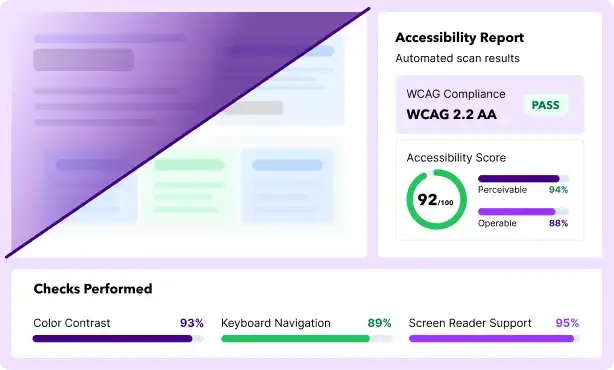
Accessibility report showing WCAG 2.2 AA compliance and accessibility score

Enter a page URL.

Submit the publicly accessible web page to evaluate.

Get an automated free accessibility audit report.

Review the findings and recommended actions.

Address the issues.

Share findings with developers, implement corrections, and verify the results.

Supports 51+ Accessibility Standards

Are you looking for a quick accessibility remediation widget?

Experience the All in One Accessibility widget and start a free trial or reach out to hello@skynettechnologies.com

FAQs

An automated accessibility tool evaluates web pages and their content for accessibility issues and determines if it complies with ADA, WCAG 2.0, 2.1, 2.2, Section 508, and other global standards. Alternatively, request a manual website accessibility audit to get detailed evaluation or reach out hello@skynettechnologies.com.

An automated scan finds certain accessibility issues. A conformance evaluation also requires manual testing, including keyboard interaction and relevant assistive technologies.

It detects Color contrast issues, Image alternative text, Missing or incorrect ARIA attributes, broken links, HTML structural elements, page titles and list elements, forms and document, readability, tables and content, audio and video.

Auto scan results are refreshed every 72 hours. After making changes to a page, allow up to 72 hours for the updated results to appear.

The Accessibility Checker is an automated tool that scans web pages to identify common accessibility issues quickly. It is ideal for initial evaluations and routine checks.

A Manual Accessibility Audit, conducted by experts, involves a thorough review of your website, including complex issues that automated tools might miss, such as contextual errors, user experience barriers, and compliance nuances. It ensures deeper insights and actionable recommendations.

For comprehensive accessibility assurance, both methods are recommended. if you are looking for more details, please contact us at hello@skynettechnologies.com.

It can flag common issues such as insufficient color contrast, missing image alt text, missing or incorrect ARIA attributes, and problems with headings, page titles, form labels, and HTML structure.

Yes, the Accessibility Testing Tool supports over 190 languages, ensuring it can analyze accessibility issues for websites catering to diverse audiences worldwide.

Yes, you can watch the demo video of Skynet Accessibility Checker. It walks you through the process of scanning web page and understanding the results.

The Free Accessibility Checker report is refreshed automatically every 72 hours, so you’ll see the updated results after that time. Alternatively, if you are considering a paid version, try Skynet Accessibility Scanning and monitoring tool.

Each scan evaluates one page. For broader coverage, scan additional URLs individually or use an accessibility scanning and monitoring tool.

Run another scan after changes to content, design, code, or functionality. Include accessibility testing for regular website maintenance.

No. Automated scans find common accessibility issues, but confirming WCAG conformance also requires manual evaluation against all applicable success criteria.

Share the report with the development team, prioritize issues that block essential tasks, and apply the recommended fixes. Review updated scan results and arrange manual testing for issues automated checks cannot be assessed.

Yes. The free accessibility checker helps find common barriers and provides recommendations for fixing them. It supports compliance efforts, but manual evaluation is also needed to assess full WCAG conformance.

Use the accessibility checker regularly and after significant changes to content, design, or functionality. Prioritize key pages such as checkout, sign-in, and contact forms.

Yes, Our ADA Checker testing tool does give option to see impact All in one Accessibility can make on the website. Please find follow screenshot for the reference.

Yes, the Skynet Accessibility Checker demo video represents how the report lists each issue with a description and suggested actions you can take to fix them.

The Free Accessibility Checker is designed to provide a quick, high-level scan of a single web page, helping users get an initial sense of accessibility status. On the other hand, the All in One Accessibility Dashboard offers a comprehensive site-wide audit, automatically scanning all pages where the widget is active. This broader scanning capability results in more in-depth reporting and is the primary reason for the difference in report scope and detail between the two tools.

Other Tools and Resources

Explore accessibility resources and tools to check accessibility compliance and remediate it.

All in One Accessibility®

AI-powered Website accessibility solution for WCAG 2.0, 2.1, 2.2, EAA and ADA compliance!

Accessibility Scanning Monitoring

Scan & Fix Website for WCAG 2.0, 2.1 and 2.2 & ADA Compliance

Free PDF Accessibility Checker

Quickly evaluate PDF documents for potential accessibility barriers before publishing or sharing.

Video Accessibility Free Checker

Evaluate videos against key WCAG requirements for captions, transcripts, audio descriptions, controls, and more.

Color Contrast Checker

Use our free web accessiblity color contrast checker to check your website's color combinations against WCAG A, AA, and AAA requirements.

Color Blindness Simulator

Shows users how their website or content appears to people with color blindness.

Accessible Color Palette Generator

Generate WCAG-friendly color combinations for more inclusive, readable digital experiences!

Accessibility Statement Generator

Show the world that you’re dedicated to making your website accessible.

File Accessibility Checker

Evaluate Word, PPT, and Excel content free for common accessibility issues.

CookiesRegTech™

Simplify cookie consent management with automated cookie scanning, tracker blocking, consent logging, and privacy-law compliance.