
The key to success with SEO is to have a clear goal and a well-defined strategy.- Neil Patel
So, what can be done to have well-defined strategies?
Planning! But planning on what?
To brainstorm and plan, organizations need concrete data with justified reasons to work on them to impress search engines. Isn’t it?
Well, Search Engine Optimization (SEO) is a dynamic field and staying ahead of trends is crucial for digital success. And to maintain a decent search engine position, organizations use some tools to gather data. Google Trends is one of such powerful tools that helps marketers and content creators analyze search behavior, discover trending topics, and refine their SEO strategies.
Leveraging Google Trends effectively is important to drive more organic traffic to websites. In this guide, we’ll explore how to use Google Trends effectively to enhance search engine optimization (SEO) performance.
Google Trends – Crucial information to know!
Google Trends is a free tool for digital platforms that analyses the popularity of search queries over time and gives the data in visually appealing graphs. Users can compare multiple keywords, analyze search trends across different regions, and track interest fluctuations based on timeframes.
The tool is invaluable for identifying emerging trends and reining SEO strategies accordingly.
Key features of Google Trends:
- Search Volume Index: Tracks keyword popularity over time.
- Geographic Data: Highlights regions where a term is searched the most.
- Related Queries: Displays additional relevant search terms.
- Category Filters: Allows users to analyze trends within specific industry.
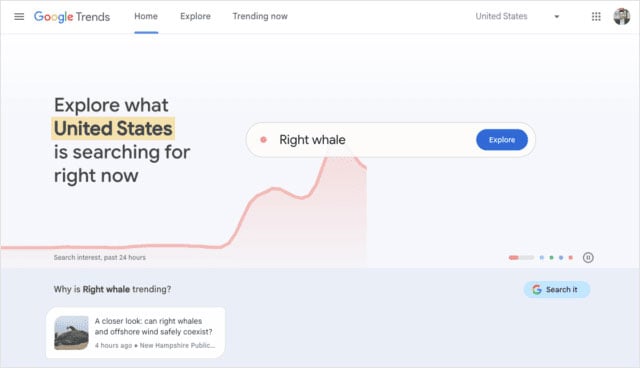
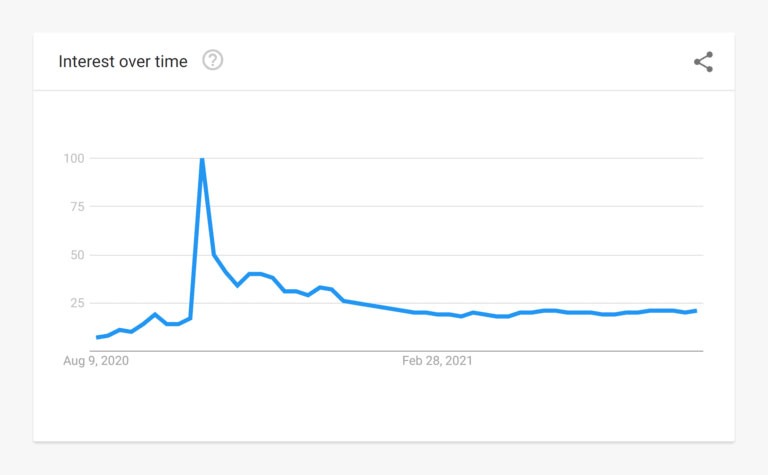
Below images show how someone can enter a keyword to get the results in graphical representation.
Areas wherein Google Trends assists organizations!
- To find trending keywords
Keyword research is a cornerstone of SEO, and Google Trends is a reliable tool for discovering trending search terms. Thus, instead of relying solely on traditional keyword research tools, use Google Trends to spot search terms or keywords that are gaining traction.
How to identify trending keywords:
- Enter a keyword in the search bar.
- Select the desired time range (like the past 24 hours, 12 months, or 2 years) to see trends over time.
- Analyze related queries and rising keywords to identify new opportunities.
- Compare multiple keywords to determine which one has a higher search volume.
- To recognize seasonal trends
Seasonal trends play a crucial role in content marketing and ecommerce. Google Trends helps predict the best times to create, optimize, and publish seasonal content.
For example: An online store selling winter clothing, searching for terms like “winter jackets” on Google Trends will reveal the months when demand peaks. This helps store to plan content and marketing campaigns efficiently in advance.
Steps to know the trends:
- Enter a seasonal keyword in Google Trends.
- Select a multi-year timeframe (let’s say, 5 years) to spot recurring search patterns.
- Align the content creation and promotion with peak search periods.
- To analyze regional interest
For businesses focusing on local SEO, Google Trends provides insights into where specific search terms are most popular. This is particularly useful for location-based marketing.
How to use it:
- Enter a keyword and scroll down to see interest by region.
- Identify locations where demand is high and tailor content accordingly.
- Use geo-targeted keywords in PPC campaigns and SEO content.
- To plan content and discover topics
Google Trends is a goldmine for content ideation. By analyzing trending searches, identifying hot topics that align with specific niche and creating engaging content is possible, which ultimately provide competitive edge to organizations.
How to use it:
- Check the “Trending Now” section for breaking news and viral topics.
- Use related queries to discover potential blog post ideas.
- Monitor search trends within the industry category.
- Create content clusters around trending keywords to improve topical authority.
- To monitor competitor’s keywords
Staying ahead of competitors requires understanding their keyword strategies. Google Trends allows businesses/organizations to compare search terms and analyze which keywords their competitors are ranking for.
How to conduct competitor analysis:
- Enter the target keyword alongside a competitor’s keyword.
- Analyze search trends over time to compare the search visibility.
- Identify keywords where competitors have stronger search visibility.
- Adjust the SEO strategy for rising keywords.
Wrapping up
To boost SEO strategy using Google Trends, marketers can use search interest data to identify emerging topics, compare keyword popularity, understand seasonal demand, and uncover regional search patterns. These insights can help shape content calendars and keyword priorities around what audiences are actively searching for.
Google Trends works best when combined with broader SEO analysis. Search trends should be evaluated alongside search intent, keyword competitiveness, existing rankings, website performance, and audience behavior to make informed optimization decisions rather than relying on trend data alone.
Skynet Technologies provides SEO services covering website audits, technical SEO, on-page and off-page optimization, local and international SEO, ecommerce SEO, mobile app SEO, content strategy, and custom analytics. Request a Free SEO Assessment to identify opportunities for improving your search strategy.


